Race Scoring Software for Sailing Clubs

Race scoring

Race Scoring Software for Sailing Clubs

Score club races in SailHQ. Tap finishes as boats cross the line, add codes and discards, then publish results to members and your club website.
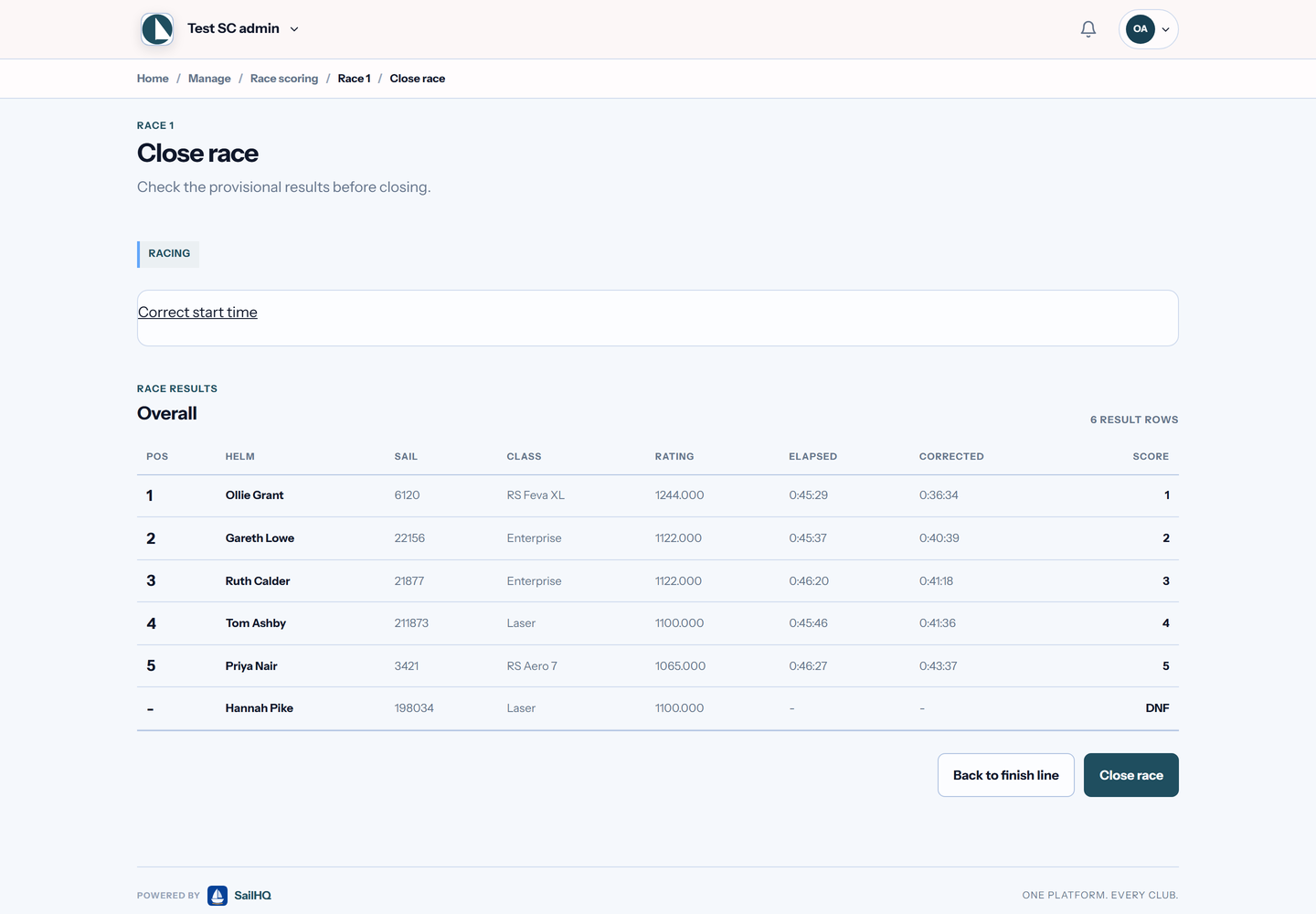
SailHQ close race screen listing six boats with Portsmouth Yardstick ratings, elapsed and corrected times, points and one DNF
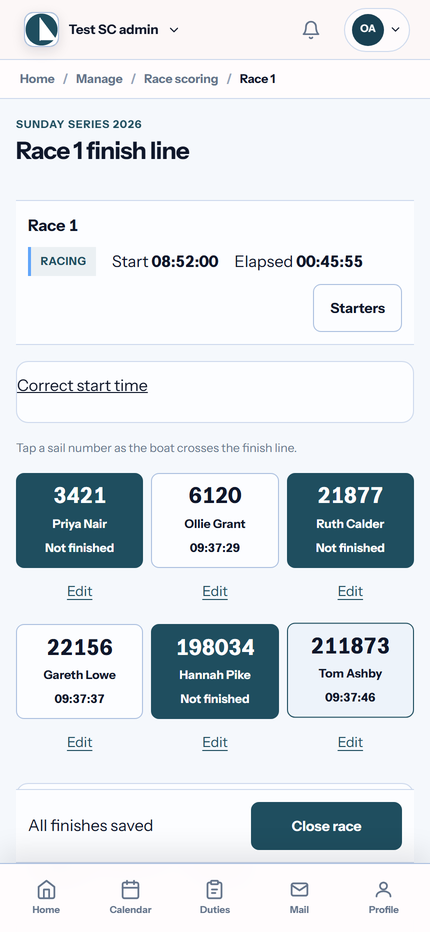
SailHQ finish line screen on a phone, with three sail numbers tapped as finished and three still racing
Tap finishes on a phone, then check corrected times before you close the race
Race day

How a race day works

Six steps, from the first starter to published results.

Leg 1

Add the starters

Pick members' boats and add any visitors racing with you.

Leg 2

Set the starts

Run one start or several, with one or more fleets in each.

Leg 3

Start the race

If the start was wrong, undo it. If the weather turns, abandon the race.

Leg 4

Record the finishes

Tap each sail number as the boat crosses the line. Move a finish if two boats are in the wrong order.

Leg 5

Add codes

Give a code to each boat that did not finish normally, such as DNF, RET or OCS.

Leg 6

Publish

Show a Provisional banner while protests are heard, or make the results final straight away.
A race officer in a lakeside race hut taps finishes into a phone as two dinghies cross the finish line by an orange buoy
At the finish

Results from the race hut window

The race officer records each finish on a phone as boats cross the line, in the order they finish.

See real results

  1. Tap the sail number Each tap records a finish, in order.
  2. Close finishes Move a finish if two boats are in the wrong order.
  3. Codes for the rest Add DNF, RET or OCS for boats that did not finish normally.
Ratings

A rating system for each fleet

Each fleet uses one rating system, so a dinghy handicap fleet and a keelboat IRC fleet can race in the same series.

Portsmouth Yardstick

The RYA handicap numbers for dinghies and small keelboats. Upload the Portsmouth Number list as a CSV file instead of typing each number in.

IRC

Rating certificates for keelboats and yachts.

Other TCF ratings

Any other time correction factor your fleet uses.

SCHRS

The Small Catamaran Handicap Rating System for catamaran fleets.

If a rating changes part way through a series, record the new figure for a whole class or a single boat, starting from a race you choose.

Series

Series scoring, discards and pursuit races

Low point scoring

Discards and tie-breaks are worked out for you across the series.

Average lap

In Portsmouth and TCF fleets, boats that sailed different numbers of laps are scored on their average lap time.

Pursuit start sheet

The slowest class starts first. Each faster class starts later by the time it can give away over the race.

Result codes

DNC, DNS, OCS, UFD, BFD, NSC, DNF, RET, DSQ, DNE, DGM, ZFP, SCP, DPI and RDG.

Prizes and records

Prize lists, print and downloads

Prize lists

Set up prize lists for each fleet. They show with the published results.

Print and CSV

Print a series for the noticeboard, or download the series standings and each race's results as CSV files.

PY return check

Before you send a PY return, SailHQ checks the club's RYA Club ID, an RYA Class ID for every finisher's class, and sail numbers containing a "/" that PY Online does not accept. Only Portsmouth fleets count.

You also get a CSV for the club's own record. Sending the return to the RYA from SailHQ is not available yet.

Sailwave

Already using Sailwave?

You can keep it. Import Sailwave HTML results, check a private preview, then publish them to members and the club website. Download Sailwave entry files for a series or a race day.

When you are ready to score in SailHQ, publishing a series that already has Sailwave standings lets you replace them.

Included on every plan

Race scoring is part of every SailHQ plan. Prices are per member, and the first 6 months are free for a new club.

Common questions

Race scoring questions

Portsmouth Yardstick, IRC, other time correction factors (TCF) and SCHRS. Each fleet uses one rating system, so a series can score a Portsmouth fleet and an IRC fleet side by side.

Yes. A race officer can add visitors as starters alongside members, and they appear in the results.

SailHQ uses low point scoring with discards and tie-breaks. Average lap racing is available in Portsmouth and TCF fleets.

Yes. You can import Sailwave HTML results and download Sailwave entry files. When you publish SailHQ scoring for a series that already has Sailwave standings, you can replace them.

On the member portal and the public club website. You can show a Provisional banner while protests are heard, or make results final straight away.

Not yet. SailHQ checks a series for the PY return and gives you a CSV for the club record. The return itself is still sent to the RYA separately.

Score your club racing in SailHQ

Plan the race programme, run the duty rota and publish results in one place. The first 6 months are free for a new club, with no card needed to start.